
Featured Projects

Interactive eLearning Module
Master's capstone project developed with Articulate Rise, featuring custom graphics created with Adobe Photoshop and Canva.
Canvas Course and Video Tutorials
Online course developed in Canvas LMS, including authentic assessments and video tutorials created with Adobe Premiere Pro.

Faculty Development Module
Online learning module developed with a website builder platform, incorporating infographics created with Adobe Photoshop.
Articulate Storyline
My professional experience includes developing accessible, interactive eLearning in Articulate Storyline 360.
Examples of client deliverables are not displayed in my portfolio because of confidentiality restrictions.
Project 1
Interactive eLearning Module | Articulate Rise
For my Master of Education in Learning Design and Technology capstone project, I developed a responsive, interactive eLearning module using Articulate Rise.
This project explores the value and practice of implementing user experience design strategies to create more engaging and effective online learning experiences.
It breaks down each component of the User Experience Design for Learning (UXDL) Honeycomb, which is a framework adapted by University of Waterloo’s Centre for Extended Learning and based on Peter Morville’s UX Honeycomb.
Design Approach
Using the UXDL Honeycomb as the organizing framework for the course, I divided the content into focused sections addressing the qualities of effective online learning experiences and combined concise explanations, practical examples, custom infographics, and interactive activities to support understanding. Mayer’s multimedia principles and Universal Design for Learning informed decisions about content organization, visual communication, accessibility, and learner engagement. Articulate Rise provided a responsive structure that supports consistent navigation across devices.
Goal 1: Articulate the value of applying user experience design principles to online learning experiences.
Objectives:
1.1 Describe the concept of user experience design and place the UX Honeycomb within that context.
1.2 Make connections between the concepts of user experience design and the practice of designing for online learning.
1.3 Name the components that make up the UXDL Honeycomb.
Goal 2: Describe how Mayer’s Multimedia Principles employ cognitive theory to improve online learning experiences.
Objectives:
2.1 Use Mayer’s Cognitive Theory of Multimedia Learning to describe some fundamental aspects of how people learn.
2.2 Name effective strategies to minimize distraction when designing online learning.
2.3 Name effective strategies to help people process new material when designing online learning.
2.4 Name effective strategies to help people construct a model of the material when designing online learning.
Goal 3: Describe how evoking positive emotions in people helps them learn more effectively.
Objectives:
3.1 Explain how people’s emotions can affect how they learn.
3.2 Name effective strategies that can be used to positively influence learning outcomes.
Goal 4: Articulate the need for accessible online learning experiences and how it can be achieved with Universal Design for Learning.
Objectives:
4.1 Identify strategies for using multiple means of representation to make online learning experiences more accessible to a diverse audience.
4.2 Identify strategies for using multiple means of action and expression to make online learning experiences more accessible to a diverse audience.
4.3 Identify strategies for using multiple means of engagement to make online learning experiences more accessible to a diverse audience.
Goal 5: Make the connection between the credibility and the quality of an online learning experience.
Objectives:
5.1 Identify quality of scholarship as a way to improve the credibility of online learning experiences.
5.2 Identify quality of instructional design as a way to improve the credibility of online learning experiences.
5.3 Identify quality of visual and interface design as a way to improve the credibility of online learning experiences.
Goal 6: Articulate the value and methods of making online learning experiences more intuitive for people to use.
Objectives:
6.1 Explain the importance of making sure online learning experiences are findable and usable.
6.2 Identify some strategies that make online learning experiences more intuitive.
6.3 Describe how usability testing can improve online learning experiences.
Objectives:
1.1 Describe the concept of user experience design and place the UX Honeycomb within that context.
1.2 Make connections between the concepts of user experience design and the practice of designing for online learning.
1.3 Name the components that make up the UXDL Honeycomb.
Goal 2: Describe how Mayer’s Multimedia Principles employ cognitive theory to improve online learning experiences.
Objectives:
2.1 Use Mayer’s Cognitive Theory of Multimedia Learning to describe some fundamental aspects of how people learn.
2.2 Name effective strategies to minimize distraction when designing online learning.
2.3 Name effective strategies to help people process new material when designing online learning.
2.4 Name effective strategies to help people construct a model of the material when designing online learning.
Goal 3: Describe how evoking positive emotions in people helps them learn more effectively.
Objectives:
3.1 Explain how people’s emotions can affect how they learn.
3.2 Name effective strategies that can be used to positively influence learning outcomes.
Goal 4: Articulate the need for accessible online learning experiences and how it can be achieved with Universal Design for Learning.
Objectives:
4.1 Identify strategies for using multiple means of representation to make online learning experiences more accessible to a diverse audience.
4.2 Identify strategies for using multiple means of action and expression to make online learning experiences more accessible to a diverse audience.
4.3 Identify strategies for using multiple means of engagement to make online learning experiences more accessible to a diverse audience.
Goal 5: Make the connection between the credibility and the quality of an online learning experience.
Objectives:
5.1 Identify quality of scholarship as a way to improve the credibility of online learning experiences.
5.2 Identify quality of instructional design as a way to improve the credibility of online learning experiences.
5.3 Identify quality of visual and interface design as a way to improve the credibility of online learning experiences.
Goal 6: Articulate the value and methods of making online learning experiences more intuitive for people to use.
Objectives:
6.1 Explain the importance of making sure online learning experiences are findable and usable.
6.2 Identify some strategies that make online learning experiences more intuitive.
6.3 Describe how usability testing can improve online learning experiences.
Custom Infographics
The User Experience Design for Learning Rise course includes custom graphics that I created with Adobe Photoshop and Canva.
This example, an infographic about Mayer's multimedia principles, conveys dense, complex information in a clear, organized format and includes graphical elements to facilitate understanding.

Project 2
Canvas Course
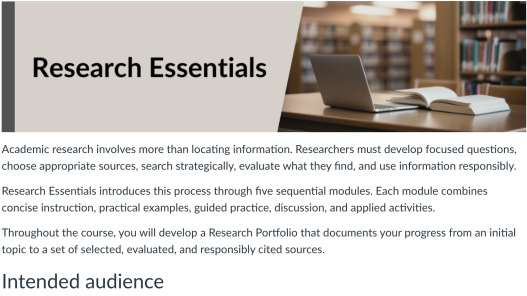
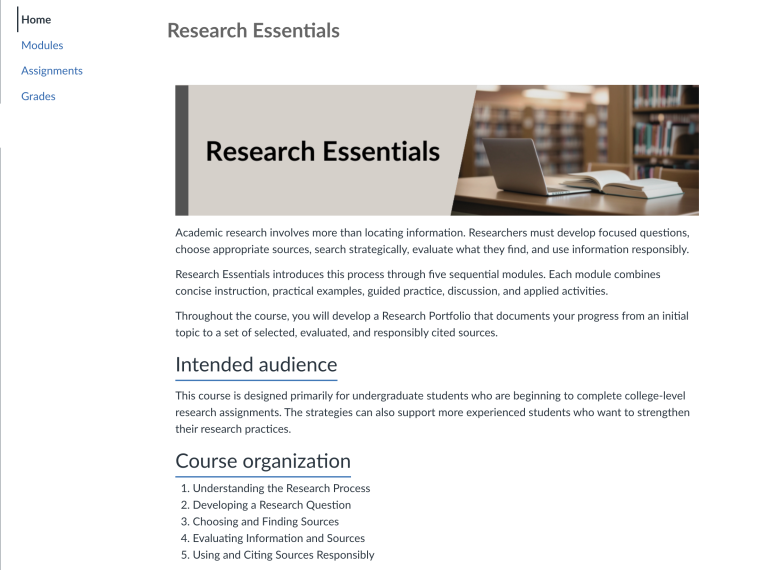
Research Essentials is a five-module online information literacy course designed for undergraduate students. The course guides learners through the research process—from interpreting an assignment and developing a focused research question to finding, evaluating, integrating, and citing sources. Students build a Research Portfolio through scaffolded assignments completed across the course.
I developed the complete course architecture in Canvas and fully developed Module 3, Choosing and Finding Sources, as a representative module. The prototype demonstrates course organization, instructional sequencing, guided practice, multimedia integration, authentic assessment, accessibility, and Canvas configuration.
Design Approach
I used backward design within an iterative, ADDIE-informed process. Beginning with the culminating Research Portfolio, I mapped its components to the five course modules and aligned each module’s objectives, instruction, practice, and assessments with those components. Module 3 follows a Gagné-informed sequence: it activates the research question developed in Module 2, presents and models source-selection and search strategies, provides guided practice and feedback, and culminates in an applied assignment.
Video Tutorials
I used Adobe Premiere Pro to produce video tutorials for the Canvas course. This example demonstrates how to use OneSearch, an integrated discovery tool on the library website, to locate and use print and electronic books about arts administration topics.
To build these multimedia assets, I also used QuickTime for screen capture, Audacity for audio recording and editing, and PowerPoint for presentation graphics.

Project 3

Faculty Development Module
I designed and developed this self-paced online learning module to help university faculty learn about and adopt Open Educational Resources (OER). The project combines instructional content, multimedia, performance support tools, and learner assessments to guide faculty through the process of locating, evaluating, adapting, and implementing OER in their courses. It was developed as part of a campus-wide initiative to promote affordable learning and student success.
Design Approach
I designed OER 101 as a practical faculty development experience organized around the decisions instructors make when adopting open educational resources. The module progresses from foundational concepts to locating, evaluating, adapting, and implementing OER in a course. I combined concise instruction, multimedia, custom infographics, practical examples, performance support resources, and assessments to make complex copyright and licensing information easier to understand and apply. The design emphasizes transfer by connecting each topic to authentic course-development decisions.
Custom Infographics
The OER 101 learning module includes custom graphics that I created with Adobe Photoshop.
This visual reference guide about Creative Commons Licenses displays each type of license in a clear, easy-to-scan format, making complex concepts more accessible for everyday decision-making.
This visual reference guide about Creative Commons Licenses displays each type of license in a clear, easy-to-scan format, making complex concepts more accessible for everyday decision-making.
